Filing an FIR (First Information Report) is often just the first step. After that, most people feel stuck—they don’t know what’s happening with their complaint, whether any action has been taken, or if the case is moving forward.
The good news is, you don’t have to keep visiting the police station again and again. Today, you can check your FIR status online using simple official portals.
Let’s go step by step and cover all the methods clearly.
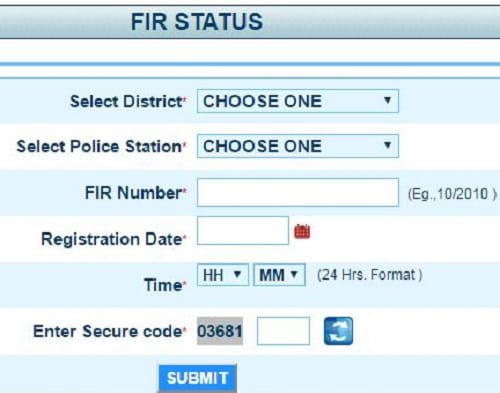
What You Need Before Checking FIR Status
Keep these details ready:
- FIR number
- Police station name
- Date of FIR (if possible)
- Your name or mobile number
If you don’t have FIR number, don’t worry—there are ways to search using other details too.
Method 1: Check FIR Status via State Police Website (Most Common Method)
Each state police has its own online portal.
Steps:
- Open Google
- Search:
- “Your State Police FIR status”
- Example: Odisha Police FIR status
- Open the official police website
- Look for:
- “FIR Status” or “Citizen Services”
- Enter:
- FIR number OR
- Name + date + police station
- Click Search
What you will see:
- FIR details
- Case status
- Investigation progress
- Officer details (sometimes)
Method 2: Check via Crime and Criminal Tracking Network & Systems (CCTNS) Portal
This is a central government system.
Steps:
- Visit the CCTNS website
- Click on “Citizen Services”
- Select “Search FIR”
- Enter details:
- FIR number
- State
- District
- Police station
- Fill captcha
- Click Search
Result:
- FIR status
- Case progress
- FIR copy (in some cases)
Method 3: Check FIR Status via Mobile Apps
Some states provide apps for easy access.
Examples:
- Odisha Police Citizen Portal
- Other state police apps
Steps:
- Download app
- Log in or register
- Go to FIR section
- Enter FIR details
Method 4: Check FIR Status Using FIR Copy
If you have a copy of FIR:
Steps:
- Look at FIR number and police station
- Use these details on:
- State police website
- CCTNS portal
This is the easiest way if you already have documents.
Method 5: Check FIR Status via SMS or Helpline
Some states offer SMS or helpline services.
Steps:
- Call police helpline number
- Provide FIR number
- Ask for status
Or:
- Send SMS (if service available in your state)
Method 6: Visit Police Station (Offline Method)
If online methods don’t work:
Steps:
- Visit the police station where FIR was filed
- Provide FIR number
- Ask officer for status
Best for:
- Detailed updates
- Legal clarity
What FIR Status Shows
When you check status, you may see:
- FIR registered
- Under investigation
- Chargesheet filed
- Closed case
- Pending
Common FIR Status Terms Explained
- Registered → FIR is officially filed
- Under Investigation → Police is working on the case
- Chargesheet Filed → Case moved to court
- Closed → Case completed or no evidence
Common Problems & Solutions
1. FIR not showing online
→ Data may not be updated yet
2. Wrong FIR number
→ Double-check details
3. Website not opening
→ Try later or use another browser
Important Tips
- Always keep FIR copy safe
- Note FIR number immediately
- Check status regularly
- Follow up if no update for long time
Warning Signs
- No update for months
- FIR not found online
- Incorrect details
In such cases, follow up with police or legal help.
Quick Checklist
- FIR number ready
- Correct police station selected
- Official website used
- Details entered correctly
Final Thoughts
Checking FIR status online is simple today. With portals like CCTNS and state police websites, you can track your case without hassle.
If you want the fastest method, use your state police website or CCTNS with your FIR number. It takes just a minute.
Stay informed, follow up regularly, and don’t hesitate to ask questions. Because when it comes to legal matters, awareness is your biggest strength.