If you want a space-saving computer that still gets the job done, an All-in-One PC is worth considering. It combines the processor, storage and screen into one unit, with no bulky tower or tangled wires. Many buyers also look for an All-in-One PC with a touchscreen, since it adds convenience for everyday tasks. In this guide, we cover top AiO models, what to check before buying, the benefits and a simple checklist to help you choose.
Top All-in-One PCs for home & business
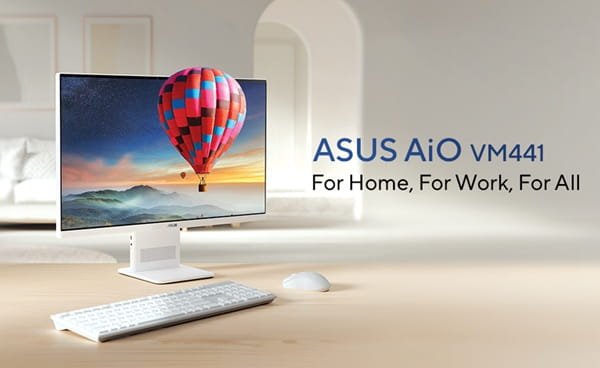
ASUS AiO VM441QA
The ASUS AiO VM441QA is a Copilot+ PC built for everyday use. As an All-in-One PC with a touchscreen, it brings a clutter-free design with immersive visuals and intelligent AI features packed into one sleek unit. It comes with Dolby Atmos speakers, AI-enhanced microphones and a privacy shutter, making it a solid pick for work, calls and entertainment alike.
| Specification | Details |
| Processor | Up to Qualcomm® Snapdragon® X Processor (30MB Cache, up to 3.0GHz, 8 Cores, 8 Threads) with Qualcomm® Hexagon™ NPU up to 45 TOPS |
| Graphics | Qualcomm® Adreno™ GPU |
| Display | 60.45 cm (23.8) Touchscreen FHD (1920 x 1080), 16:9 Aspect Ratio, 300 nits Brightness, 75Hz Refresh Rate |
| Memory | Up to 16GB LPDDR5x onboard RAM |
| Storage | Up to 1TB M.2 NVMe™ PCIe® 4.0 SSD with 100GB Cloud Storage
(Microsoft 365 Basic, 1 Year) |
| Price | ₹104,990 |
Disclaimer: Prices are subject to change, kindly visit the product website for actual costing.
Lenovo ThinkCentre Neo
The Lenovo ThinkCentre Neo 50a Gen 5 is a 27-inch all-in-one PC built for hybrid workspaces and daily office tasks. It runs on an Intel® Core™ processor and delivers a sleek, low-noise experience with a nearly borderless display. With AI-powered video conferencing, wireless charging support and ThinkShield security features, it fits comfortably into both home office and business setups.
| Specification | Details |
| Processor | Up to 13th Generation Intel® Core™ i5-13420H Processor
(E-cores up to 3.40 GHz, P-cores up to 4.60 GHz) |
| Graphics | Integrated Intel® UHD Graphics for 13th Gen Intel® Processors |
| Display | 68.58 cm (27) FHD (1920 x 1080), IPS, Anti-Glare, Non-Touch, 99% sRGB,
300 nits, 100Hz, 14ms |
| Memory | Up to 16 GB DDR5-5200MT/s (SODIMM) |
| Storage | Up to 512 GB SSD M.2 2280 PCIe Gen4 QLC |
| Price | ₹96,990 |
Disclaimer: Prices are subject to change, kindly visit the product website for actual costing.
HP 24-cr0471in
The HP 24-cr0471in is a 60.5 cm all-in-one PC designed for everyday computing with a clean, space-saving build. It runs on an Intel® Core™ processor and is made using post-consumer recycled and ocean-bound plastics, along with EPEAT® Gold and ENERGY STAR® certification. With a full HD display and privacy camera, it suits home users looking for a reliable, eco-conscious all-in-one PC.
| Specification | Details |
| Processor | Up to Intel® Core™ i5-1334U Processor (up to 4.6 GHz with Intel® Turbo Boost Technology, 12 MB L3 Cache, 10 Cores, 12 Threads) |
| Graphics | Intel® Iris® Xe Graphics |
| Display | 60.5 cm (23.8) FHD (1920 x 1080), IPS, Three-Sided Micro-Edge, Anti-Glare, 250 nits, 99% sRGB |
| Memory | Up to 8 GB DDR4-3200 MT/s (1 x 8 GB) |
| Storage | Up to 512 GB PCIe® NVMe™ M.2 SSD |
| Price | ₹98,197 |
Disclaimer: Prices are subject to change, kindly visit the product website for actual costing.
Key things to check before buying
Before you buy an All-in-One PC, it helps to know what actually matters. Here are the main things to look at.
Display size and resolution
The screen is the biggest part of the unit, so check its size and resolution. Full HD works fine for daily use, while 4K helps if you work with photos, videos or detailed spreadsheets. Screen sizes usually range from 21 to 27 inches, so pick one based on your desk space and how you plan to use it.
Processor and RAM
The processor decides how smoothly your computer runs. It is sufficient to have 8 GB RAM for common operations like surfing, sending emails and creating documents. Choose a storage capacity of 16 GB or more if you often switch between tasks.
Storage type
Your computer’s storage capacity has an impact on how quickly it starts up and opens files. An SSD is much quicker than a traditional hard drive, so most modern All-in-One PCs now come with SSD storage, sometimes paired with extra HDD space.
Graphics
If you mostly do office work, browsing or streaming, integrated graphics are enough. But if you edit videos or work with design software, look for dedicated graphics.
Ports and connectivity
Check how many USB and HDMI ports the PC offers. Also look for WiFi 6 and Bluetooth support, since these make it easier to connect accessories and stay online without extra cables.
Webcam, mic, and speakers
Since many people use their computer for video calls, a good built-in webcam and clear speakers can save you from buying extra accessories later.
Touchscreen option
If you like a more hands-on way of working, an All-in-One PC with a touchscreen can make browsing, sketching or presenting feel more natural, especially for creative work or quick note-taking.
Benefits of All-in-One PCs
Saves desk space
Since everything is built into the screen, you do not need a separate tower. This is especially useful for smaller rooms, shared workspaces or minimal desk setups.
Easy to set up
You just plug it in and start using it. There are no extra cables to manage or parts to assemble, so even someone with no technical background can get started in minutes.
Clean and modern look
An All-in-One PC gives your desk a neat, clutter-free appearance. With slim designs and minimal cables, it fits well into both home and office setups.
Good for video calls
Most models come with a built-in camera, mic, and speakers, so you are ready for online meetings or classes without needing separate equipment.
Quick buying checklist
Before you make your final decision, run through this checklist:
- Screen size and resolution that suit your work
- At least 8GB RAM, more if you multitask
- SSD storage for faster performance
- Graphics type based on your usage
- Enough USB and HDMI ports
- WiFi 6 and Bluetooth support
- Good webcam and speaker quality
The bottom line
Choosing the right All-in-One PC comes down to understanding what you actually need it for. If you are looking for something simple, space-saving, and easy to set up, this type of computer fits well into homes, small offices, and everyday work. Keep your usage in mind, check the specifications that matter most to you, and you will be able to pick a system that works comfortably for years to come.