When you check into a hotel room, your privacy and safety should be non-negotiable. Unfortunately, concerns about two-way mirrors, hidden cameras concealed behind glass, or surveillance devices disguised as everyday fixtures are genuine — and while most hotels are completely trustworthy, it is always wise to do a quick privacy check when staying somewhere unfamiliar. Awareness is your first and most powerful tool.
A two-way mirror — also called a one-way mirror or observation glass — looks identical to a regular mirror from the front but allows someone on the other side to see through it when their side is darker. Hidden cameras can also be disguised behind or within mirror frames. This guide walks you through every practical method to check mirrors in a hotel room, step by step, so you can stay with complete peace of mind.
Important: Covert surveillance of guests in private hotel rooms is illegal under Indian law (Section 66E of the IT Act and IPC provisions on privacy) and the laws of most countries. If you find evidence of hidden recording devices in your hotel room, do not touch or remove anything — document it with photos and contact local police immediately.
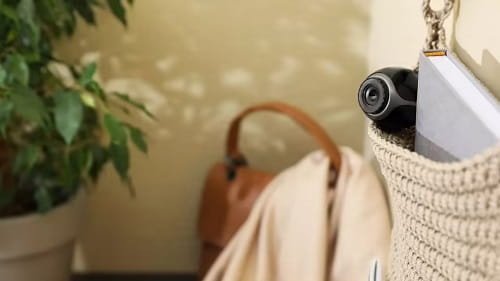
Why Checking Hotel Mirrors and Privacy is Important
Understanding the risk and the reasons for this check helps you stay calm and thorough:
- Two-way mirrors do exist: While uncommon, two-way mirrors have been found in hotels, changing rooms, and rental properties — particularly in lower-budget or poorly regulated accommodations.
- Hidden cameras in mirror frames: Modern miniature cameras can be easily hidden inside or behind mirror frames, smoke detectors, clocks, and other fixtures.
- International travel risk: Privacy regulations vary by country. In some regions, hotel oversight and regulation is minimal — making self-checks particularly important.
- Peace of mind: Even when the risk is minimal, completing a quick 5-minute check allows you to relax and enjoy your stay without any nagging worry.
- Children’s safety: Parents travelling with children have additional reason to verify the room’s privacy before allowing children to change or bathe.
- Vulnerable situations: Solo travellers, especially women, benefit from a quick room privacy audit as part of their standard safety routine.
Method 1: The Fingernail Test (Quick First Check)
The fingernail test is the most well-known and widely shared method for distinguishing a regular mirror from a two-way mirror. It works because of a fundamental difference in how the two types of mirrors are constructed.
Steps to Follow:
- Touch the tip of your fingernail directly to the surface of the mirror.
- Observe the gap between your actual fingernail and its reflection in the mirror.
- On a standard mirror: there will be a visible gap between your fingernail and its reflection — approximately 3 to 5 mm. This gap exists because the reflective coating is on the back of the glass, and your finger touches the front surface first.
- On a two-way mirror: your fingernail and its reflection will appear to touch directly — with no visible gap. This is because two-way mirrors have the reflective coating on the front surface of the glass.
- If the reflection appears to touch your fingernail with zero gap, treat the mirror with suspicion and proceed to the additional verification methods below.
- Be aware: this test can be affected by thick glass or unusual mirror construction. Always combine it with at least one other method for confirmation.
Pro Tip: Use your phone case edge or a credit card instead of your fingernail — the flat, precise edge makes the gap (or lack thereof) easier to see accurately.
Method 2: The Darkness Test (Most Reliable Visual Check)
A two-way mirror works by exploiting the difference in light levels between two sides. The viewing side must be darker than the observed side for the glass to work as a window. You can exploit this same principle to check whether a mirror is two-way by creating darkness on your side.
Steps to Follow:
- Turn off all the lights in the room — or wait until nighttime when no external light enters through windows.
- Cup both hands around your eyes to block any residual light, and press them firmly against the mirror surface, creating a seal.
- Look through the gap between your hands into the mirror.
- If the mirror is a regular mirror: you will see only your own reflection and darkness — you will not be able to see anything through the glass.
- If the mirror is a two-way mirror: you may see a lit room, corridor, or space on the other side — because the other side is illuminated and your side is now dark, reversing the optical effect.
- If you can see any light, shapes, or a room through the mirror, this is a serious red flag. Do not touch anything — leave the room immediately and contact hotel management and the police.
Pro Tip: Use your phone’s torch to shine light directly at the mirror surface while keeping the rest of the room dark. On a regular mirror the light reflects back at you. On a two-way mirror, some light will pass through and illuminate the other side, which you may be able to detect through cupped hands.
Method 3: Check the Mirror Frame and Mounting (Physical Inspection)
A physical inspection of the mirror and its surroundings can reveal installation details that are inconsistent with a standard decorative mirror — and may indicate a surveillance setup or two-way installation.
Steps to Follow:
- Check how the mirror is mounted: standard decorative mirrors hang on hooks or are fixed to the wall with small screws visible on the frame. A mirror that is flush-mounted directly into the wall — like a window frame — with no visible means of hanging or removal deserves closer inspection.
- Check the frame edges: on standard hotel mirrors, the back of the mirror is visible from the sides — you can see the glass edge, backing, and any frame material. If the mirror sits flush against the wall with no visible edge or gap at the sides, it may be built into the wall.
- Knock on the wall around the mirror: a standard wall will produce a solid knock. If the wall directly behind the mirror sounds hollow compared to the surrounding wall, it may indicate a space or room behind the mirror.
- Check for unusual wiring: look around the mirror frame for any small holes, wires, or unusual fittings that would not be part of a standard mirror installation.
- Look for small pinholes in the frame or wall near the mirror: miniature cameras are often just 2 to 4 mm in diameter and can be concealed in small holes drilled into wood, plaster, or decorative trim.
- Check the mirror’s reflection quality: two-way mirrors are often slightly darker or have a slightly greenish or bluish tint compared to standard mirrors — because the semi-transparent coating reduces the amount of light reflected.
Note: Many modern hotels mount large mirrors directly against the wall for aesthetic reasons — a flush-mounted mirror alone is not evidence of surveillance. Always combine this physical check with the darkness test and fingernail test before drawing any conclusions.
Method 4: Use Your Smartphone Camera to Detect Hidden IR Cameras
Many hidden cameras — particularly those designed for low-light or night-time operation — use infrared (IR) LEDs for illumination. The human eye cannot see infrared light, but most smartphone cameras can detect it. This method is particularly effective for finding cameras hidden in or near mirrors, smoke detectors, clocks, or TV sets.
Steps to Follow:
- Turn off all lights in the hotel room to create a dark environment.
- Open your smartphone’s default camera app and switch to the front-facing (selfie) camera — front cameras on most smartphones do not have an IR filter and are better at detecting infrared light.
- Point the camera slowly around the room, paying particular attention to mirrors, smoke detectors, alarm clocks, air vents, and any decorative objects.
- Look at the camera screen — if any device is emitting infrared light, it will appear as a bright white, purple, or pink glow on your camera screen even though you cannot see it with your naked eye.
- Move the phone slowly and check all corners, the bathroom mirror, and behind the TV.
- If you see an unexplained glow coming from any object — particularly one that is not a remote control or obviously an IR device — investigate further or contact hotel management immediately.
Pro Tip: Test your phone’s IR detection ability before relying on it — point your camera at a TV remote control and press any button. If you can see a flicker of white or purple light on your phone screen, your camera is detecting IR and the method will work for hidden camera detection.
Method 5: Use a Hidden Camera Detector App or RF Detector
Dedicated hidden camera detector apps and physical radio frequency (RF) detector devices take the smartphone scan a step further — offering more systematic scanning capabilities for detecting wireless surveillance signals, lens reflections, and IR emissions.
Via Hidden Camera Detector App:
- Download a reputable hidden camera detector app — options include “Hidden Camera Detector” by Future Apps Inc., “Fing” (network scanner), or “Glint Finder” from the Play Store or App Store.
- Open the app and follow its scanning instructions — most apps use the phone camera to detect lens reflections (the glint from a camera lens) and IR emissions.
- Slowly scan around the room, moving the phone in a systematic grid pattern to cover all surfaces — walls, mirrors, fixtures, vents, and furniture.
- If the app alerts you to a potential lens or IR source, investigate that specific location more closely using the darkness test or physical inspection.
Via RF Detector (Physical Device):
- Purchase a compact RF (radio frequency) detector device — available online for Rs. 500 to Rs. 2,000 — or borrow one if you travel frequently.
- Turn on the detector and slowly move it around the room, particularly near mirrors, smoke detectors, clocks, and wall sockets.
- The detector will beep or flash when it detects a wireless signal being transmitted by a surveillance camera broadcasting over Wi-Fi, Bluetooth, or RF.
- Note that RF detectors will also pick up legitimate Wi-Fi routers, phones, and Bluetooth devices — use it as one signal among several rather than a definitive standalone detector.
Note: No app or detector is 100% foolproof. Some wired cameras transmit no wireless signal and will not be detected by RF scanners. Always combine multiple methods for a thorough check.
Method 6: Check the Hotel’s Wi-Fi Network for Unknown Devices
Many modern hidden cameras transmit footage over Wi-Fi. If you connect to the hotel’s Wi-Fi network, you can use a network scanning app to see all devices connected to the same network — which may reveal an unknown camera device.
Steps to Follow:
- Connect your smartphone to the hotel’s Wi-Fi network.
- Download a network scanner app — “Fing” is one of the most reliable and widely used options, available free on both Android and iOS.
- Open Fing and tap “Scan for Devices” — it will identify all devices connected to the same Wi-Fi network.
- Review the list of connected devices — you will typically see phones, laptops, smart TVs, and hotel-managed devices.
- Look for any devices labelled as cameras, generic unknown devices with unfamiliar manufacturer names, or devices with IP camera-related identifiers in their hostname.
- If you find a suspicious device that cannot be explained by standard hotel equipment, take a screenshot and report it to hotel management and, if necessary, the police.
- Note that this method only detects cameras connected to the hotel’s Wi-Fi — cameras transmitting on a separate network, recording locally, or using cellular data will not appear in this scan.
Pro Tip: Use Fing to scan the network immediately upon checking in — before connecting any of your own devices. This gives you a cleaner baseline of what devices were already on the network before your arrival.
Quick Reference: Hotel Mirror and Privacy Check Methods
Use this table to choose the best methods for a thorough room privacy check:
| Method | What It Detects | Requirements |
| Fingernail Test | Two-way mirror glass type | Your finger — no tools needed |
| Darkness Test | Room visible through mirror | Dark room — no tools needed |
| Frame + Wall Inspection | Unusual mounting, pinholes, wiring | Your eyes and hands |
| Smartphone IR Camera Scan | Infrared-emitting hidden cameras | Smartphone + dark room |
| Detector App / RF Device | Wireless camera signals + lens glints | App or physical RF detector |
| Wi-Fi Network Scan (Fing) | Wi-Fi connected hidden cameras | Smartphone + hotel Wi-Fi |
Where to Check Beyond the Mirror — Full Room Privacy Audit
Hidden cameras are not limited to mirrors. Here is a checklist of all the common locations to inspect in a hotel room for a complete privacy check:
| Location | What to Look For |
| Mirrors (bedroom + bathroom) | Two-way glass, flush mounting, hollow wall behind, discolouration |
| Smoke detectors | Unusual holes, extra LEDs, non-standard positioning, non-functional test button |
| Alarm clock or clock radio | Pinholes, unusual LED indicators, lens glint in the dark |
| Air vents and grilles | Objects placed inside, small holes, wires running to unusual locations |
| Electrical sockets and USB ports | Misaligned cover plates, unusual depth, pinhole in the centre |
| TV and TV stand | Unusual pinholes on the frame, extra LED lights not matching the model |
| Picture frames and artwork | Frames tilted slightly, unusually thick, small holes, wires behind |
| Decorative objects and flower vases | Unexpected weight, small lenses, objects facing the bed or bathroom |
What to Do If You Find a Hidden Camera or Two-Way Mirror
If any of your checks reveal a genuine hidden camera or a suspicious mirror installation, stay calm and follow these steps:
- Do not touch, move, or tamper with the device — this preserves it as evidence for law enforcement.
- Do not confront hotel staff directly — if the surveillance is set up by staff or management, alerting them could allow evidence to be destroyed.
- Document everything: take clear photographs and videos of the device, its exact location, and the surrounding area using your smartphone.
- Leave the room calmly and immediately: collect your belongings quickly and check out.
- Contact local police: in India, file a complaint at the nearest police station or call 100. Mention Section 66E of the IT Act (violation of privacy) in your complaint.
- Report to the hotel chain’s corporate office: if it is a chain property, report to the brand’s national customer service — chain hotels have serious reputational stakes and typically respond swiftly.
- File a complaint with the Ministry of Tourism’s hotel complaints portal or your state’s tourism department for a formal record.
Conclusion
Checking the mirrors and general privacy of a hotel room takes less than five minutes and requires nothing more than your fingernail, a dark room, and a smartphone. The vast majority of hotel rooms will pass every test without a single concern — but the peace of mind that comes from doing a quick check is valuable in itself, particularly when staying somewhere unfamiliar or in a region with limited oversight.
Make this a standard part of your check-in routine: do the fingernail test on arrival, run the darkness test on any large bathroom or bedroom mirrors, do a quick IR scan with your phone camera in the dark, and scan the Wi-Fi network with the Fing app. Your privacy is a right — and these simple steps ensure that right is protected wherever you stay.

Santosh Kumar, the author behind IndiasStuffs.com, is passionate about sharing valuable insights on a variety of topics, including lifestyle, technology, and Indian culture.
Page Contents