The train chart — officially called the reservation chart — is one of the most important documents for any Indian Railways passenger. It is the coach-wise list of all passengers booked on a particular train for a specific date, showing each passenger’s berth number, name, age, booking status, and seat assignment. The chart is prepared by Indian Railways a few hours before the train’s departure and is physically pasted on each coach. But for millions of passengers who want to confirm their berth, check their co-passengers, track last-minute allotments for waitlisted tickets, or simply plan their journey — the ability to check the chart online before reaching the station is invaluable.
Indian Railways and several authorised platforms make the reservation chart accessible online — and this guide walks you through every available method, step by step. Whether you booked through IRCTC, a travel agent, or the station counter, the chart information is the same and equally accessible through the methods described here.
Why Checking the Train Chart Online Matters
The reservation chart contains information that goes far beyond just your berth number:
- Confirm berth allotment: Even if your PNR shows confirmed status, the chart confirms the exact berth number assigned — coach number, side or middle berth, lower or upper — before you board.
- Track waitlist and RAC status: The chart shows whether waitlisted or RAC (Reservation Against Cancellation) tickets have been upgraded to confirmed berths after the final chart preparation.
- Identify co-passengers: The chart lists all passengers in your coach with their names and ages — useful for families travelling separately or passengers wanting to recognise travel companions.
- Locate your coach position: Charts often include coach order information, helping you board from the correct door position on the platform without rushing.
- Check vacant berths: Empty berths visible on the chart indicate seats available for current booking or Tatkal — useful if you want to book a last-minute additional berth.
- Verify booking details: Cross-checking your name, age, and berth on the chart ensures there were no data entry errors at the time of booking.
Important: The train chart is prepared approximately 4 hours before the train’s scheduled departure from the originating station. It will not be available online before this time. If you check earlier and see no chart, try again closer to departure.
Method 1: Check Train Chart via IRCTC Website (Official Method)
The IRCTC website is the official ticketing platform of Indian Railways and provides direct access to the reservation chart for any train. This is the most authoritative method and requires no login for chart viewing.
Steps to Follow:
- Open a browser and visit the IRCTC website: https://www.irctc.co.in
- On the homepage, look for the “Train” section or use the top navigation menu.
- Click on “PNR Status” to check your current booking status first — note your coach and berth number if already confirmed.
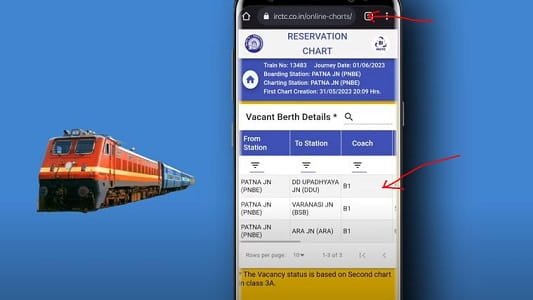
- To view the full chart, navigate to the “Trains” section and click on “Chart / Vacancy” from the menu.
- Enter your train number and the journey date in the fields provided.
- Click “Get Chart” or “View Chart.”
- The reservation chart will be displayed — you can view it coach by coach. Select your coach (e.g., S1, S2, B1, A1) from the dropdown or list.
- Find your name and berth assignment in the displayed passenger list for your coach.
- You can also check for vacant berths in the same view — empty rows in the chart indicate unoccupied berths.
Pro Tip: On the IRCTC chart page, you can also view the full train route with all intermediate stations and the coach composition — the order of coaches from engine to guard’s van. This helps you identify which end of the platform to stand on for boarding.
Method 2: Check Train Chart via the IRCTC Rail Connect App
The IRCTC Rail Connect app is the official Indian Railways booking and travel management app. It offers chart viewing, PNR status, live train tracking, and booking — all in one place on your smartphone.
Steps to Follow:
- Download the “IRCTC Rail Connect” app from the Google Play Store or Apple App Store.
- Open the app and log in with your IRCTC credentials — or use it without login for chart viewing.
- On the home screen, tap on “Chart / Vacancy” from the quick access menu or the bottom navigation.
- Enter the train number and travel date in the search fields.
- Tap “Get Chart” and wait for the chart to load.
- The app will display a coach-wise passenger list — select your coach from the list at the top.
- Scroll through the coach chart to find your berth, confirm your name and co-passengers, and check for vacant berths in the same coach.
- Tap on any passenger entry to see their booking status — confirmed, RAC, or waitlisted.
Pro Tip: The IRCTC Rail Connect app also has a live train tracking feature — use it alongside the chart to see exactly where your train is right now and estimate the arrival time at your boarding station.
Method 3: Check Train Chart via the National Train Enquiry System (NTES)
The National Train Enquiry System (NTES) is the official Indian Railways information portal that provides live train running status, seat availability, and reservation charts — without requiring any booking or login.
Steps to Follow:
- Open a browser and visit the NTES portal: https://enquiry.indianrail.gov.in
- On the homepage, locate the “Reservation Chart” option from the main menu or services list.
- Click on “Reservation Chart / Vacancy” or navigate to the chart enquiry section.
- Enter the train number and the date of journey in the fields provided.
- Click “Get Chart” or “Submit.”
- The portal will display the chart for the selected train — choose your coach from the tabs or dropdown menu.
- Review the passenger list for your coach — each row shows berth number, passenger name, age, and booking status.
- You can also download or print the chart directly from this portal for reference during travel.
Note: The NTES portal is maintained directly by Indian Railways and is updated in real time. It also provides spot your train, arrival and departure times at stations, and train schedule — making it the most comprehensive official railway information platform.
Method 4: Check Train Chart via RailYatri, ixigo, or Confirmtkt Apps
Several popular third-party train travel apps provide reservation chart access with cleaner interfaces, better search functionality, and additional features like seat layout visualisers and prediction tools — making them a convenient alternative to the official portals.
Via RailYatri:
- Download the RailYatri app or visit https://www.railyatri.in
- Tap or click on “Check Coach Position” or navigate to “Train Info” from the menu.
- Enter your train number and journey date.
- Select “Reservation Chart” from the train details page.
- Choose your coach from the list and view the full passenger chart with berth layout.
Via ixigo Trains:
- Download the ixigo Trains app or visit https://www.ixigo.com/train
- Search for your train by number or name.
- On the train details page, tap “Coach Position” or “Seat Map” to access the reservation chart.
- Select your coach and view the chart — ixigo also shows a visual seat layout with occupied and vacant berths colour-coded for easy identification.
Pro Tip: ixigo’s visual seat map view is particularly helpful for families — you can see at a glance which berths are occupied and which are vacant in the same bay, making it easier to plan seating arrangements before boarding.
Method 5: Check Train Chart via PNR Status on WhatsApp or SMS
Indian Railways offers PNR status enquiry — which includes berth and chart details once the chart is prepared — through WhatsApp and SMS, making it accessible without any app downloads or internet browsing.
Via WhatsApp (IRCTC Official):
- Save the IRCTC WhatsApp number +91-7428000001 in your contacts.
- Open WhatsApp and start a chat with this number.
- Type your 10-digit PNR number and send it as a message.
- IRCTC’s WhatsApp bot will reply with your PNR status — including your coach number, berth number, and booking status once the chart has been prepared.
Via SMS:
- Open the SMS app on your mobile phone.
- Type: PNR <space> your 10-digit PNR number. For example: PNR 2514567890
- Send this SMS to 139 — the official Indian Railways enquiry number.
- You will receive an SMS reply with your booking status including coach, berth, and chart details once available.
- Standard SMS charges apply based on your mobile operator’s plan.
Note: The SMS to 139 service works 24 hours a day. It is especially useful when travelling in areas with poor internet connectivity — as long as your phone has cellular signal, you can check your PNR and chart status via SMS.
Method 6: Check the Physical Chart Posted on the Train Coach
Once you arrive at the station and the train is on the platform, the physical reservation chart is pasted on the side of each coach near the door. This is the final, official reference and is the same data as the online chart.
Steps to Follow:
- Arrive at the platform before the train departs — charts are typically pasted on coaches 30 to 60 minutes before departure.
- Walk along the platform and look for the large white or printed sheets of paper pasted on the outside of each coach near the entry door.
- Each chart sheet is labelled with the coach number at the top — for example, “S1,” “B2,” or “A1.”
- Find the chart for your coach and scan the berth-wise passenger list to locate your name.
- Your berth number, booking status (confirmed, RAC, or WL), and co-passengers in the same bay will all be visible.
- If your coach chart shows your berth as vacant despite a confirmed ticket, notify the TC (Ticket Collector) immediately before boarding.
Pro Tip: If you cannot find the chart on the coach, look for the Train Chart Display Boards now installed at several major stations — these digital boards show the coach-wise chart on a large screen near the entry points of the platform.
Quick Reference: Train Chart Check Methods at a Glance
Use this table to choose the best method based on your situation:
| Method | Best Use Case | Requirements |
| IRCTC Website | Official detailed chart + vacancy check | Train no. + date + internet |
| IRCTC Rail Connect App | On-the-go mobile chart check | App + smartphone + internet |
| NTES Portal | Official real-time chart + train info | Train no. + date + internet |
| RailYatri / ixigo / Confirmtkt | Visual seat map + cleaner UI | App or browser + internet |
| WhatsApp (7428000001) / SMS 139 | No app, works with basic internet or SMS | PNR number + phone |
| Physical Chart on Coach | Final confirmation at the station | Being present at platform |
Understanding Train Chart Status Terms
When you view the reservation chart, you will see various status codes and terms. Here is what each one means:
| Status / Term | What It Means |
| CNF / Confirmed | Berth is confirmed and assigned — your seat is guaranteed |
| RAC | Reservation Against Cancellation — you share a side lower berth with another RAC passenger; may be upgraded to full berth if a cancellation occurs |
| WL / Waitlist | Ticket is waitlisted — no berth assigned yet; you need to check if it moves to CNF or RAC before chart preparation |
| PQWL | Pooled Quota Waitlist — applies to intermediate station bookings; clears separately from the main waitlist |
| RLWL | Remote Location Waitlist — for bookings from smaller, less popular stations |
| GNWL | General Waitlist — the standard waitlist for point-to-point bookings; most likely to clear |
| CAN / MOD | Cancellation or modification — the berth was previously booked but cancelled; appears as vacant in the chart |
| VS / Vacant | Berth is vacant — either unclaimed, cancelled, or available for current booking at the station |
Troubleshooting: Common Issues When Checking the Train Chart Online
Here are solutions to the most common problems passengers face when checking the train chart:
- Chart not yet available: The chart is prepared approximately 4 hours before the train’s departure from the originating station — not your boarding station. If your train originates far away, the chart may be available earlier in the day. Keep checking after the 4-hour window.
- Name not appearing on the chart: If your ticket is on waitlist or RAC and the chart has been prepared, your name appears at the bottom of the coach chart — not in the confirmed berth section. Check the RAC and WL sections at the end of each coach’s chart.
- Chart shows different coach or berth than expected: Coaches are sometimes reshuffled or replaced before departure. The chart prepared 4 hours before departure reflects the final coach assignments — always trust the online chart over your original ticket’s coach number.
- IRCTC portal loading slowly: The IRCTC website experiences very high traffic on travel days. Try the NTES portal at enquiry.indianrail.gov.in as an alternative — it is faster and less congested.
- PNR not found via SMS or WhatsApp: Ensure you are sending the correct 10-digit PNR number. Do not include spaces or hyphens. If the problem persists, try checking on the IRCTC website directly.
- Chart shows ticket as cancelled but you did not cancel: Contact IRCTC customer care at 14646 or 08044647999 immediately — this may indicate a system error or fraudulent cancellation.
Conclusion
Checking the train chart online has become one of the most routine pre-journey tasks for Indian Railways passengers — and with six reliable methods available, there is always a way to access your chart regardless of whether you have a smartphone, a basic phone, or are already on the platform. The IRCTC website and NTES portal remain the gold standard for accuracy, while WhatsApp and SMS to 139 provide hassle-free access for passengers with limited internet access.
Make it a habit to check the chart at least 2 hours before your train’s departure — confirm your berth number, identify your coach position on the platform, and verify that your waitlisted ticket has cleared if applicable. A two-minute chart check can save you from platform confusion, berth disputes, and the stress of boarding the wrong coach on a long-distance journey.